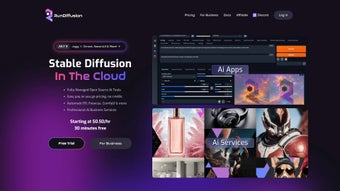

Download RunDiffusion – Cloud‑Based AI Art Generation Platform
Overview
RunDiffusion is a cloud‑based AI art generation platform that brings the power of the latest diffusion models to anyone with an internet connection. Whether you are a hobbyist looking to experiment with AI‑generated illustrations, a professional designer needing fast mock‑ups, or a business seeking to integrate custom image synthesis into your workflow, RunDiffusion offers a fully managed environment that eliminates the need for local GPU hardware, complex installations, or deep‑learning expertise. The service bundles popular open‑source tools such as Automatic1111, Fooocus, and ComfyUI, and adds proprietary utilities like Invoke for in‑painting, a built‑in file browser, and a “Smart Timer” that tracks session duration and cost.
Private workspaces can be provisioned in under two minutes, and the platform supports instant refunds for any unused compute time, making it a cost‑transparent solution for creators of all skill levels. With industry‑leading boot times, pre‑loaded models, and multiple server speed tiers, RunDiffusion delivers high‑quality images in seconds while keeping the user experience simple, secure, and scalable. In addition to the core generation capabilities, RunDiffusion provides an API for developers, bulk licensing options for enterprises, and a community marketplace where users can share prompts, styles, and custom nodes.
Security is a top priority; every workspace runs in an isolated container, data is encrypted at rest and in transit, and the platform complies with GDPR and ISO‑27001 standards. This combination of ease‑of‑use, powerful features, and rigorous security makes RunDiffusion a compelling choice for anyone looking to explore AI‑driven creativity without the traditional hardware constraints.
- Instant Private Workspaces: Spin up an isolated environment in less than 120 seconds, complete with dedicated storage and compute resources.
- Pre‑Integrated AI Engines: Automatic1111, Fooocus, ComfyUI, and Invoke are ready‑to‑use, eliminating the need for manual configuration.
- Smart Timer & Cost Control: Real‑time tracking of session duration, automatic cost calculation, and refund of any unused minutes.
- Built‑in File Browser: Drag‑and‑drop file management, version control, and quick access to model checkpoints directly in the browser.
- Multi‑Server Speed Options: Choose from standard, high‑performance, or ultra‑fast GPU clusters based on project urgency.
- Professional AI Business Services: API access, bulk licensing, and custom model training for enterprises.
- Cross‑Platform Compatibility: Accessible from Windows, macOS, Linux, Android, and iOS through any modern web browser.
- Security & Privacy: End‑to‑end encryption, isolated containers, and GDPR‑compliant data handling.
- Regular Model Updates: Automatic updates to the latest diffusion models, including Stable Diffusion XL, SD3, and custom fine‑tuned variants.
- Community Marketplace: Share and import prompts, styles, and custom nodes created by the RunDiffusion community.
Installation, Usage & Compatibility
Getting Started – No Download Required
Because RunDiffusion lives entirely in the cloud, there is no traditional installation process. Users simply create an account on the RunDiffusion website, verify their email, and log in to the dashboard. From there, the “Create Workspace” button launches a wizard that asks for basic preferences (GPU tier, storage size, and optional API key) and then provisions a fully configured environment in under two minutes. All heavy lifting—driver installation, CUDA setup, model loading—occurs on RunDiffusion’s servers, so the user’s local machine only needs a stable internet connection and a modern web browser (Chrome, Edge, Firefox, or Safari are all supported). This eliminates the typical barrier of hardware incompatibility and lets you focus on creativity from the first click.
Step‑by‑Step Usage
- Log In: Navigate to rundiffusion.com and sign in.
- Create Workspace: Choose a GPU tier (Standard, High‑Performance, Ultra‑Fast) and allocate storage.
- Select a Tool: Click on Automatic1111, Fooocus, or ComfyUI from the toolbar.
- Load a Model: Pick a pre‑loaded checkpoint or upload your own custom model.
- Generate Art: Enter a text prompt, adjust parameters (steps, CFG scale, sampler), and hit “Generate”.
- Manage Output: Use the built‑in file browser to rename, organize, or download images.
- Track Costs: Watch the Smart Timer in the corner; stop the session when you’re done to avoid extra charges.
- Refund Unused Time: If you end a session early, click “Refund” and the system credits the remaining minutes back to your account.
Operating System Support
RunDiffusion is a web‑based SaaS solution, which means it works on any operating system that can run a contemporary browser. Supported platforms include:
- Windows 10, 11
- macOS Ventura and later
- Linux distributions with recent kernels (Ubuntu, Fedora, Debian)
- Android 9+ (via Chrome or Firefox)
- iOS 14+ (via Safari or Chrome)
Because all processing happens on remote GPUs, users do not need to worry about local GPU compatibility, driver versions, or library dependencies. The platform also offers a lightweight mobile‑optimized interface that scales down UI elements for smaller screens while preserving full functionality, ensuring that creators can generate images on tablets or smartphones without sacrificing performance.
Pros, Cons & Frequently Asked Questions
Pros
- Zero‑setup – No drivers, libraries, or hardware required.
- Fast boot times and instant access to pre‑loaded diffusion models.
- Transparent pricing with a Smart Timer and refund capability.
- Robust security with isolated containers and end‑to‑end encryption.
- Scalable GPU tiers suitable for casual creators and enterprise workloads.
- Community marketplace that fosters sharing of prompts and custom nodes.
- API access for developers who want to embed image synthesis into their own products.
Cons
- Requires a stable internet connection; offline use is not possible.
- Premium GPU tiers can become costly for heavy, continuous usage.
- Limited customization of underlying server environment compared to self‑hosted solutions.
- Free tier offers limited GPU minutes, which may not satisfy power users.
- Learning curve for advanced features such as custom node creation in ComfyUI.
FAQ
Is there a free version of RunDiffusion?
Yes, RunDiffusion offers a free tier that includes 5 minutes of GPU time per day and access to the basic model library. It’s perfect for testing prompts and exploring the interface before committing to a paid plan.
How does the Smart Timer work?
The Smart Timer starts automatically when you launch a workspace and stops when you end the session. It displays real‑time cost calculations based on the GPU tier you selected. If you close the session early, any remaining minutes are refunded to your account.
Can I upload my own custom diffusion models?
Absolutely. Paid plans include a model upload feature that lets you store custom checkpoints in your private workspace. The platform supports .ckpt, .safetensors, and .pt formats.
Is my data safe on RunDiffusion?
RunDiffusion adheres to GDPR and ISO‑27001 standards. All files are encrypted at rest and in transit, and each workspace runs in an isolated container that prevents cross‑user data leakage.
Do I need to know coding to use Automatic1111 or ComfyUI?
No. While these tools offer advanced scripting capabilities for power users, RunDiffusion provides a visual UI with preset templates, sliders, and drag‑and‑drop nodes, allowing non‑technical users to generate images without writing a single line of code.
RunDiffusion bridges the gap between powerful diffusion models and everyday creators. Its cloud‑first approach eliminates hardware barriers, and the Smart Timer adds a level of financial transparency rarely seen in AI SaaS platforms. While the lack of offline capability may deter some, the breadth of pre‑installed tools and the seamless UI make it a top choice for anyone serious about AI‑generated art.
Conclusion & Call to Action
In a market crowded with self‑hosted solutions and fragmented open‑source projects, RunDiffusion stands out as a polished, secure, and instantly accessible AI art generation platform. Its combination of pre‑loaded tools, cost‑transparent Smart Timer, and cross‑platform accessibility makes it an ideal choice for creators ranging from hobbyists to enterprise teams. By removing the technical friction of GPU setup and model management, RunDiffusion lets you focus on what truly matters: imagination and artistic expression.
Ready to turn ideas into high‑resolution visuals in seconds? Sign up for a free account today, spin up your first private workspace, and experience the speed of cloud‑powered diffusion. For professionals seeking higher throughput, explore the premium GPU tiers and unlock API access to embed AI image synthesis directly into your products.
Download RunDiffusion now and unleash the future of AI‑driven creativity.



.png)



